Dear Support Team, As per new email received for algo trading, Requesting you to clarify few queries.
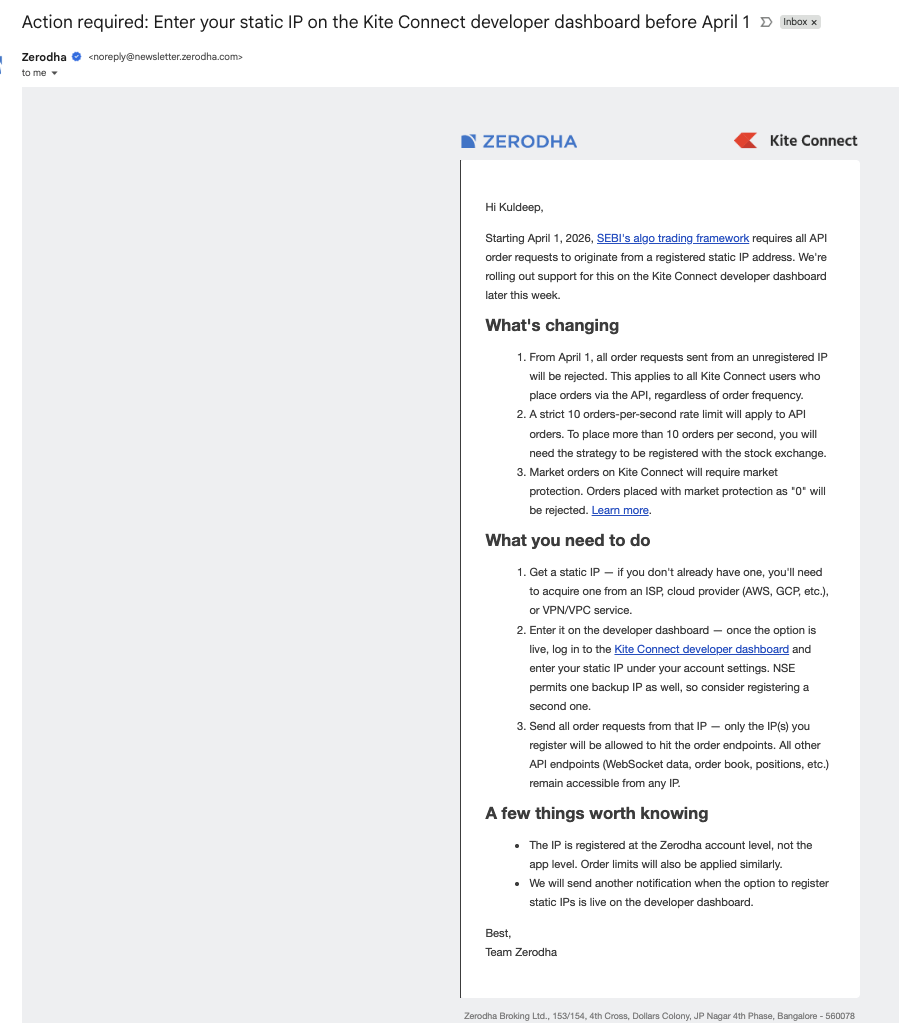
Point 3. Market orders on Kite Connect will require market protection. Orders placed with market protection as "0" will be rejected. Query - So can i sent `market_protection : -1` (Automatic market protection) or its should be strictly check the percent (Ex. 1%-10%) and sent to order payload.
Point 1- From April 1, all order requests sent from an unregistered IP will be rejected. This applies to all Kite Connect users who place orders via the API, regardless of order frequency. Query - Can i use 1/same Static IP for more then one zerodha account (for my spouse/friend) for their algo order.
Point 3. Market orders on Kite Connect will require market protection. Orders placed with market protection as "0" will be rejected. Query - So can i sent `market_protection : -1` (Automatic market protection) or its should be strictly check the percent (Ex. 1%-10%) and sent to order payload.
Point 1- From April 1, all order requests sent from an unregistered IP will be rejected. This applies to all Kite Connect users who place orders via the API, regardless of order frequency. Query - Can i use 1/same Static IP for more than one Zerodha account (for my spouse/friend) for their algo order.
Currently, the static IP should be unique and cannot be used within the family.You may refer to this thread for more details.
Thank you for clarifying my query, i am clear with my second query,
I am still confused on my first query.
Query - So can i sent `market_protection : -1` (Automatic market protection) or its should be strictly check the percent (Ex. 1%-10%) and sent to order payload.
Shall i sent `market_protection : -1` this or 0-100%.
@tuxred This feature will soon be available on the developer console. Once the option is live, you can login to the Kite Connect developer dashboard and enter your static IP under your account profile. We will send a notification once the option to register static IPs becomes available on the developer dashboard.
@tuxred At present, the static IP must be unique to each account and cannot be shared with family members, including spouses, dependent children and dependent parents. Please refer to this thread for more details.
It's very unclear how this is going to be. If I am using linode to deploy my custom application which manages multiple accounts together, it has one public ip. It executes api calls for multiple accounts from this single server. How it will work ? If I buy additional IP for that server, will that work ?
@tuxred This provision hasn't been integrated into the developer dashboard just yet. However, it is high on our priority list, and we expect it to be added in the very near future.
@yogeshs Please refer to this Exchange Circular for more information. It contains a reference to the relevant SEBI circular if you'd like to look into the finer details.
@Nivas could you explain this "If you'd like to share a static IP with family members, you can simply set up an additional app under the same developer account." If I create another app in my developer account ... how can i use my wife's api key and secret in it? Any app created in my account ... will only be allowed to use my account's credentials only .. isnt it?
btw ... I cannot use same ip for my account and my wife's account yet. please can you clarify how it should be done?
@tuxred Under a single Kite Connect developer account, you can create multiple apps, and each app can be mapped to a different client ID.
While creating an app, you will be asked to provide the client ID. This means:
You can create one app using your client ID
Another app using your spouse’s client ID
Similarly, additional apps can be created for dependent family members (children, parents).
Each app will have its own API key and secret, but all of them will be linked under the same developer account. Since the static IP is configured at the developer account level, this setup allows multiple client accounts (family members) to use the same static IP by accessing their respective apps.
So in your case:
Create separate apps for yourself and your wife under the same developer account
Use the respective API key/secret generated for each app (mapped to each client ID)
This way, both accounts can operate from the same static IP without conflict.
@Nivas so when I create a session (once per day) ... same session is applicable for my app and my wife's app too (even though its connected to different zerodha id?)?
will the charges be deducted from a single developer account or from other respective accounts after creating different apps?
@Tusshar18 There are two ways to make payments for Kite Connect paid apps. You can either link your Zerodha account on the Billing page, in which case the charges will be debited directly from the linked trading account, or make payments via the payment gateway.
If you have multiple apps associated with different Zerodha client IDs, you can choose a single account to link for handling all payments or make payments via the payment gateway. At present, there isn’t an option to map multiple client IDs for payments under a single developer account.
@Nivas Can I share that same single static IP with my blood relation own brother and sister (we all are unmarried), means 1 Static IP, 3 same family users?
If yes, the rate limit of 10 orders/sec is limited for that Static IP or for particular App of kite connect?
I want to know, If I have 3 apps in kite connect, all 3 accounts can send 10 orders/sec individually means 30 orders/sec max capacity of including all 3 accounts or, all the 3 apps can send max upto 10 orders/sec
@vinothjoseph Both IPv4 and IPv6 are accepted for static IP. Market protection is only applicable for MARKET and SL-M order types. It does not affect LIMIT and SL orders as they already have built-in price protection.
Can I share that same single static IP with my blood relation own brother and sister (we all are unmarried), means 1 Static IP, 3 same family users?
Sharing of IPs is only permitted between family members (spouse, dependent children, and dependent parents) as per the regulation.
I want to know, If I have 3 apps in kite connect, all 3 accounts can send 10 orders/sec individually means 30 orders/sec max capacity of including all 3 accounts or, all the 3 apps can send max upto 10 orders/sec
The Kite Connect API limit applies to individual app -level, however the order-related rate limit will apply to the individual client ID. Individual family members (as prescribed in the circular) can create individual apps on the same developer account and send 10/sec individually, irrespective of the number. apps created on the same developer account.
I have configured the IPv6 IPs in the profile on kite app but I am getting below error while executing the order. IP xxx.xxx.xx.xxx is not allowed to place orders for this app. The IP in the error is IPv4. Why this error is coming?
@vinothjoseph ... your ip address 192.168.* is a private ip typically assigned by your home wifi router. You need to provide public ip address which is assigned by your ISP.



I am still confused on my first query.
Query - So can i sent `market_protection : -1` (Automatic market protection) or its should be strictly check the percent (Ex. 1%-10%) and sent to order payload.
Shall i sent `market_protection : -1` this or 0-100%.
If I am using linode to deploy my custom application which manages multiple accounts together, it has one public ip. It executes api calls for multiple accounts from this single server.
How it will work ? If I buy additional IP for that server, will that work ?
ip_addresses
The IP address(es) you are trying to add are already linked to another account. Each IP address can only be linked to one account.
How and where do I specify that both mine and my wife's account are one family?
If you'd like to share a static IP with family members, you can simply set up an additional app under the same developer account.
Note: Sharing of IPs is only permitted between family members (spouse, dependent children, and dependent parents) as per the regulation.
If I create another app in my developer account ... how can i use my wife's api key and secret in it? Any app created in my account ... will only be allowed to use my account's credentials only .. isnt it?
btw ... I cannot use same ip for my account and my wife's account yet. please can you clarify how it should be done?
While creating an app, you will be asked to provide the client ID. This means:
- You can create one app using your client ID
- Another app using your spouse’s client ID
- Similarly, additional apps can be created for dependent family members (children, parents).
Each app will have its own API key and secret, but all of them will be linked under the same developer account. Since the static IP is configured at the developer account level, this setup allows multiple client accounts (family members) to use the same static IP by accessing their respective apps.So in your case:
- Create separate apps for yourself and your wife under the same developer account
- Use the respective API key/secret generated for each app (mapped to each client ID)
This way, both accounts can operate from the same static IP without conflict.Each session is created using:
- The API key/secret of a specific app
- The login of the corresponding client ID
So, even if both apps are under the same Kite Connect developer account:- Your app → session tied to your client ID
- Your wife’s app → session tied to her client ID
Each app will generate its own access token, and these sessions are completely independent of each other.I think it will depend on which option you chose when creating the app. see the screenshot .. there are 3 options.
If you have multiple apps associated with different Zerodha client IDs, you can choose a single account to link for handling all payments or make payments via the payment gateway. At present, there isn’t an option to map multiple client IDs for payments under a single developer account.
If yes, the rate limit of 10 orders/sec is limited for that Static IP or for particular App of kite connect?
I want to know, If I have 3 apps in kite connect, all 3 accounts can send 10 orders/sec individually means 30 orders/sec max capacity of including all 3 accounts or, all the 3 apps can send max upto 10 orders/sec
image.
IP xxx.xxx.xx.xxx is not allowed to place orders for this app.
The IP in the error is IPv4. Why this error is coming?